How to Run Meta & TikTok Ads for Spotify Smartlinks

Running paid advertising on Instagram Reels, Stories, or TikTok is one of the most effective ways for independent artists to scale their listener base. Yet, hundreds of musicians throw money into ad managers only to encounter the exact same frustrating outcome: plenty of link clicks, but almost zero increase in Spotify monthly listeners or algorithmic traction.

If your advertising budget is producing clicks without streams, you are likely suffering from two invisible conversion killers: the In-App Browser Trap and an unoptimized Spotify algorithmic signal.

Here is how to properly structure, track, and scale paid social ad campaigns that convert casual scrollers into active, recurring Spotify listeners.
1. Understanding the Algorithmic Goal: Saves vs. Passive Streams

Before spending a single dollar on Meta or TikTok, you must understand what Spotify’s recommendation algorithm is looking for. Spotify does not prioritize passive 30-second streams generated by casual clicks. Its recommendation algorithms—specifically Release Radar, Discover Weekly, and Radio—are powered by high-intent engagement signals:

  • Save Rate (Save-to-Stream Ratio): What percentage of listeners add your song to their Liked Songs or personal playlists? A healthy save rate is between 15% and 30%.
  • Artist Follower Growth: When a user follows your profile, Spotify is algorithmically obligated to deliver your future releases straight into their personal Release Radar playlist every Friday.
  • Completion Rate: Listeners who actively save your catalog rarely skip tracks, boosting your retention score across Spotify’s machine learning clusters.

A smartlink that triggers a verified 1-click Follow + Save simultaneously tells Spotify that your music has high listener retention, immediately signaling the algorithm to expand your organic reach.

2. Defeating the In-App Browser (IAB) Trap

The biggest technical barrier in music advertising is the In-App Browser. When someone clicks your ad inside Instagram, Facebook, or TikTok, the platform does not open their native browser (Safari or Chrome). Instead, it loads your landing page inside a sandboxed webview.

In standard smartlinks, this sandbox does not share authentication cookies with the Spotify app. When the user taps a standard link, they are greeted with an unfamiliar Spotify login screen. Almost nobody remembers their password while scrolling Instagram—and 80% abandon the page instantly.

How Love Button Solves the IAB Bottleneck:
Our smartlink architecture detects the user’s device environment automatically. On Android devices, it immediately executes an automated intent:// browser breakout to launch native Chrome. On iOS devices, it provides an immediate visual prompt instructing the fan to tap the three dots (⋮) and select “Open in Default Browser,” ensuring frictionless Spotify OAuth authorization.
3. Pixel Architecture & Retargeting Setup

Never run an ad campaign without tracking your audience. Running ads without pixels is equivalent to throwing away your fan data.

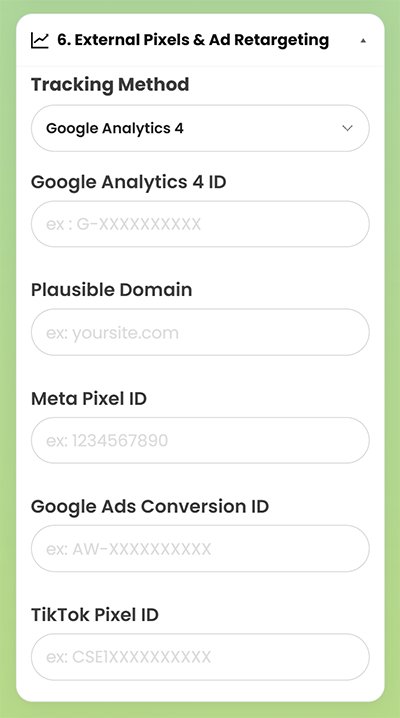
Within your Love Button Pro dashboard, navigate to the External Pixels & Ad Retargeting section and plug in your tracking credentials:

  • Meta Pixel ID: Fires automatically on page visits and enables you to build warm Custom Audiences inside Meta Ads Manager.
  • TikTok Pixel ID: Monitors traffic arriving from TikTok Spark Ads and profile campaigns.
  • Google Ads Conversion ID & GA4 / GTM: Tracks cross-channel attribution across YouTube and Google Search ads.
  • Server-Side Conversion API (CAPI): Back-end server tracking ensures conversion data is recorded even when client-side ad blockers or iOS 14.5+ privacy protections are active.

4. Ad Creative Frameworks That Convert on Reels & TikTok

Do not waste ad spend showing a static album cover with a waveform animation. High-converting mobile video ads rely on authentic, creator-led visuals. Test these three proven creative formats:

Creative FormatVisual HookAudio & Call to Action
The Studio VulnerabilityClose-up of your DAW project session, drum machine, or guitar while isolating an emotional vocal track.« I almost deleted this chorus… if you like Tame Impala or Phoebe Bridgers, tap below to save it on Spotify in 1 tap. »
The Genuine Reaction (POV)Filming a bandmate, producer, or friend hearing the final master for the first time in a car or living room.Cut the audio right before the drop or emotional peak: « Full song drops today. 1-tap save link below. »
The Lyric ResonanceCinematic, high-contrast B-roll (night driving, candid tour footage) with dynamic karaoke-style subtitles.Feature your single most relatable, hard-hitting lyrical line directly on screen.

5. Configuring Your Campaign in Meta Ads Manager

To maximize your return on ad spend (ROAS), follow these campaign settings:

  1. Campaign Objective: Choose Traffic (optimized for Landing Page Views) or Sales/Leads if optimizing for custom pixel conversion events. Never optimize for simple “Link Clicks”—this signals Meta to target low-quality bot accounts.
  2. Placements: Restrict placements to mobile-first environments: Instagram Reels, Instagram Stories, and TikTok Feed. Exclude desktop feeds and Audience Network.
  3. Geographic Targeting: Target tier-1 music consumption countries (United States, United Kingdom, Canada, Germany, France, Australia) or regions where your specific genre commands high streaming engagement. Cross-reference your Top 5 Countries in your Love Button analytics dashboard to discover where your organic fanbase is already growing.
  4. Build Your Retargeting Pool: Once your pixel logs 1,000+ visits, build a Custom Audience of past visitors (30 to 90 days) and create a 1% Lookalike Audience. Your future release campaigns will convert at significantly lower Costs Per Acquisition (CPA).

Scale Your Music Promotion Without the Leak

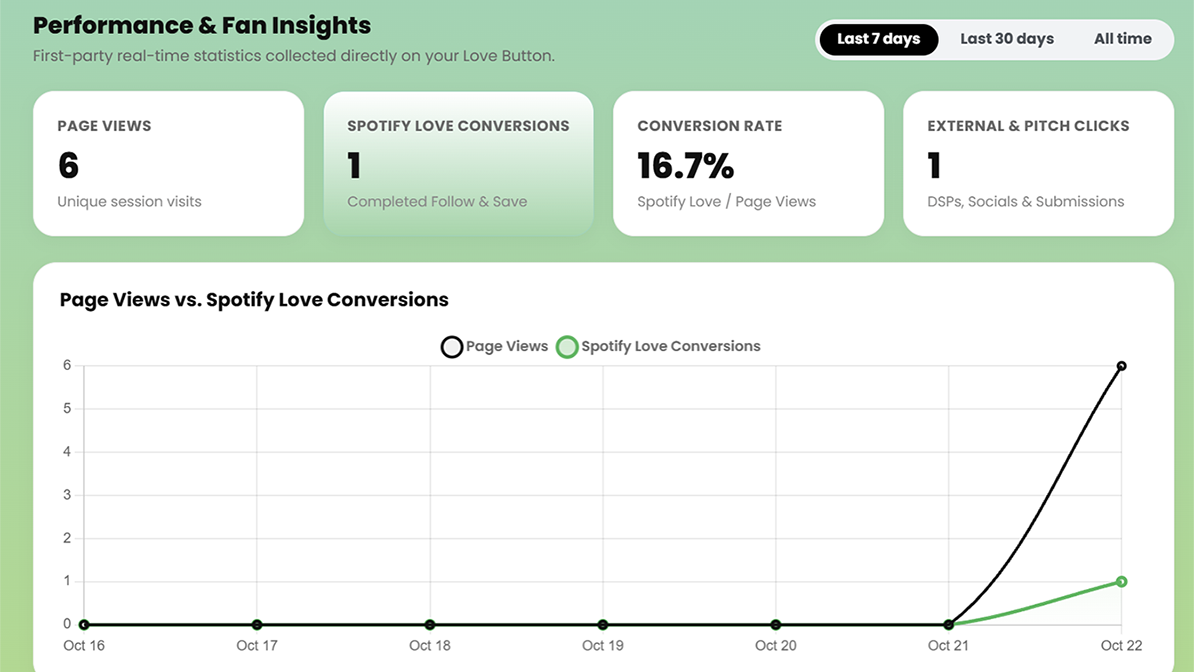
Eliminating conversion friction is the single highest-leverage improvement you can make to your music marketing strategy. When every dollar spent delivers fans directly into your Spotify ecosystem with a single tap, your organic algorithmic reach compounds with every release.
Where & How to Share Your Music Smartlink to Maximize Fans

Every independent artist faces the exact same heartbreak: you pour months of energy and budget into writing, recording, and mixing a stellar track, share a generic link-in-bio on your profiles, and watch your streaming numbers barely budge. Listeners click, get overwhelmed by choices, and leave before saving your music.

The problem is not your sound—it is your conversion funnel. Standard multi-link trees leak up to 80% of interested fans because they force users through endless menus and web-browser logins. To turn casual clicks into long-term Spotify followers, your distribution strategy must be intentional, frictionless, and omnichannel.

Here is your complete guide to placing your permanent 1-click smartlink (Love Button) across digital ecosystems and physical touchpoints for maximum conversion.

1. Digital Touchpoints: Own Your Social Real Estate

A smartlink should never remain static on a single profile. Treat your custom permanent link (lovebutton.app/your-name/) as your single source of truth across all social networks:

  • The Primary Social Bio (Instagram, TikTok, X): Ditch multi-link trees that present 15 competing options. When running a release cycle, your primary bio link must focus on one single goal: library saves and Spotify artist follows. Because your link is permanent, you never need to update your bio URL on release days—simply refresh your catalog in your dashboard.
  • YouTube Video Descriptions & Pinned Comments: YouTube accounts for massive passive discovery. On every official music video, lyric visualizer, or YouTube Short, place your 1-click smartlink on line one of the description before the “Show More” fold: « Save this track & follow our Spotify in 1 tap: lovebutton.app/artist ». Always duplicate the link in a pinned comment.
  • SoundCloud, Bandcamp & Audiomack: Fans discovering your tracks on niche streaming sites are already engaged music lovers. Direct them to your main ecosystem by embedding your smartlink into track descriptions, purchase thank-you notes, and profile headers.
  • Direct Fan Messaging (Discord, Telegram & Newsletters): When emailing your mailing list or posting an update in your artist Discord, a clean permalink allows subscribers on mobile or desktop to authenticate and follow your catalog in seconds.

2. On-Site Integration: Embed Your Smartlink on Your Official Website & EPK

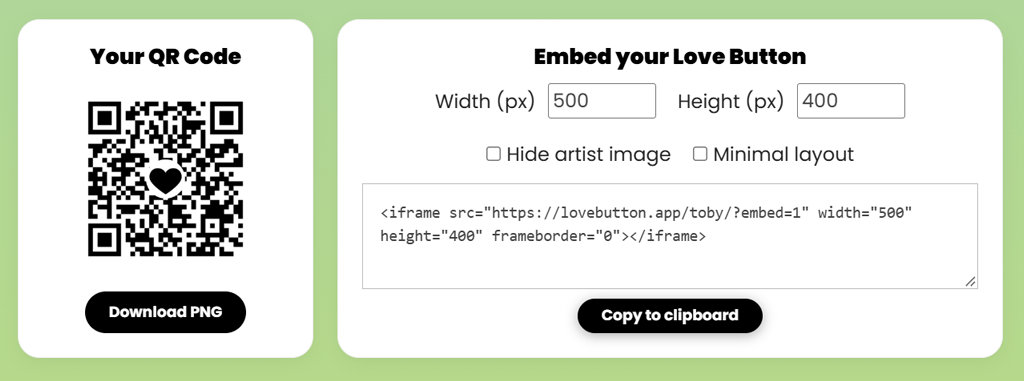
If you run a website or host an Electronic Press Kit (EPK), sending visitors off-site to streaming platforms destroys your session duration. Using responsive iframe embeds, you can bring the 1-click follow and save experience directly into your own pages.

Your public link supports seamless embedding via clean parameters (?embed=1, &hideartist=1, or &minimal=1). Here is an example of a fully responsive embed block:

Here is what the responsive embed looks like in action:

Interactive Live Demo: Test the 1-click experience directly on the left. Fans can authenticate and follow your Spotify catalog without leaving your website or EPK.

To integrate this exact standalone module onto your official site, copy and paste this code:

<!-- 1-Click Music Smartlink Embed -->
<iframe 
  src="https://lovebutton.app/your-artist-name/?embed=1" 
  width="150" 
  height="400" 
  frameborder="0" 
  style="border-radius: 20px; overflow: hidden; box-shadow: 0 4px 20px rgba(0,0,0,0.15);"
  title="Follow and Save on Spotify">
</iframe>

This allows music bloggers, booking agents, and website visitors to authenticate with Spotify directly on your domain without breaking their browsing experience.

3. Guerrilla Offline Promotion: High-Impact QR Code Marketing

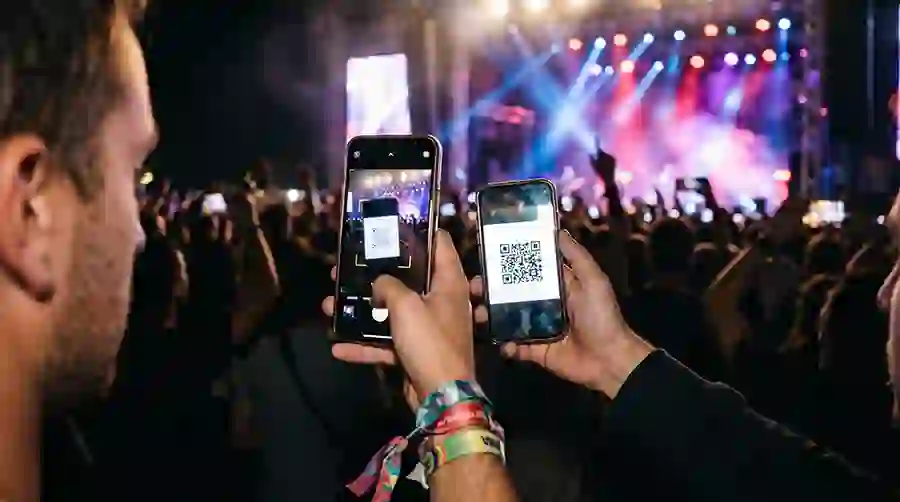
QR codes are no longer clunky novelties; they represent natural mobile behavior. When linked to an instant-action page, physical promotional materials become powerful conversion engines.

Asset TypeStrategic LocationCall to Action (CTA)
Gig Posters & FlyersVenue entrance, bar tops, restroom mirrors« Scan to save tonight’s live setlist directly to your Spotify library. »
Merchandise PackagingT-shirt hangtags, vinyl sleeves, cassette inlays« Scan to follow our private tour playlist & upcoming unreleased demos. »
Street StickersIndie venues, record store boards, rehearsal spacesMinimalist: High-contrast QR code + your artist icon + « 1-Tap Save ».
Stage Banners & Kick DrumsVisible from the audience floor during gigs« Love this track? Scan to follow our profile before the next song starts. »

Pro Tip: Always export high-resolution PNG or vector QR codes from your dashboard. Always test your physical print proofs under dim bar lighting before ordering large print batches.

4. The Tastemaker Playbook: Curation & Submission Pitching

If you run a playlist brand, an indie label, or a music blog, single-artist limitations do not fit your business. Using Curator Mode, you can transform your smartlink into a comprehensive curation and submission hub:

  • Showcase Up to 10 Spotify Playlists: Give listeners access to your entire thematic curation network in one place.
  • Cross-Catalog Mixing: Aggregate singles, albums, and tracks from different artists, bands, and labels without restrictions.
  • Integrated Pitch Hub: Enable the built-in demo submission button directly on your page. Connect up to 8 submission channels (SubmitHub, Groover, Playlist Push, Musosoup, DailyPlaylists, SoundCampaign, Google Forms, and direct email) and monitor submission clicks directly in your analytics dashboard.

Summary Checklist for Your Next Release

  1. Claim and memorize your custom permalink (lovebutton.app/artist/).
  2. Update your primary social bios across Instagram, TikTok, and YouTube.
  3. Place your link on line one of all upcoming music video descriptions.
  4. Embed the responsive 1-click widget on your official website and EPK.
  5. Print high-res QR codes on gig posters, stickers, and merch packaging.
  6. Monitor your first-party analytics dashboard to identify your top listener countries and referral channels.

Why Your Linktree is Costing You Spotify Followers (And What to Use Instead)

You just dropped a new track. You’ve spent hours creating the perfect TikTok or Instagram Reel. The video goes viral, thousands of people watch it, and you get exactly what you wanted: they click the “link in bio”.

But when you check your Spotify for Artists dashboard the next day… crickets. No new followers. A handful of streams. No algorithmic trigger.

What went wrong?

The harsh truth is that your music isn’t the problem. Your smartlink is. If you are using a traditional directory-style link like Linktree, ToneDen, or a generic smartlink, you are actively losing fans at the most critical step of the journey. Here is why, and how to fix it in 3 minutes.

The Silent Killer of Music Marketing: Decision Fatigue

When a potential fan clicks your link-in-bio, they are operating on impulse. They have a 3-second attention span.

What happens when they land on a traditional smartlink? They are hit with a wall of choices:

  • Listen on Spotify
  • Listen on Apple Music
  • Watch on YouTube
  • Buy my Merch
  • Follow my Twitter
  • Sign up for my Newsletter

In marketing psychology, this is called Decision Fatigue (or Hick’s Law). When presented with too many options, the human brain gets overwhelmed and chooses the easiest option: closing the tab. By trying to promote everything at once, you end up promoting nothing.

Clicks Don’t Trigger the Algorithm. “Saves” Do.

Even if the fan miraculously clicks the “Listen on Spotify” button on your Linktree, your job isn’t done.

Most smartlinks simply open the Spotify app (or worse, prompt the user to log in to the web browser version, causing immediate drop-offs). To the Spotify algorithm, a click means nothing. What triggers the algorithm to place you in Discover Weekly and Release Radar are Saves and Follows.

If your fan listens to 10 seconds of the song and leaves without saving it, the algorithm registers it as a negative signal.

The Alternative: The “One-Click” Paradigm

To turn casual scrollers into actual Spotify fans, you need to eliminate friction. You need to replace the “directory” with a dedicated conversion tool.

This is exactly why we built Love Button.

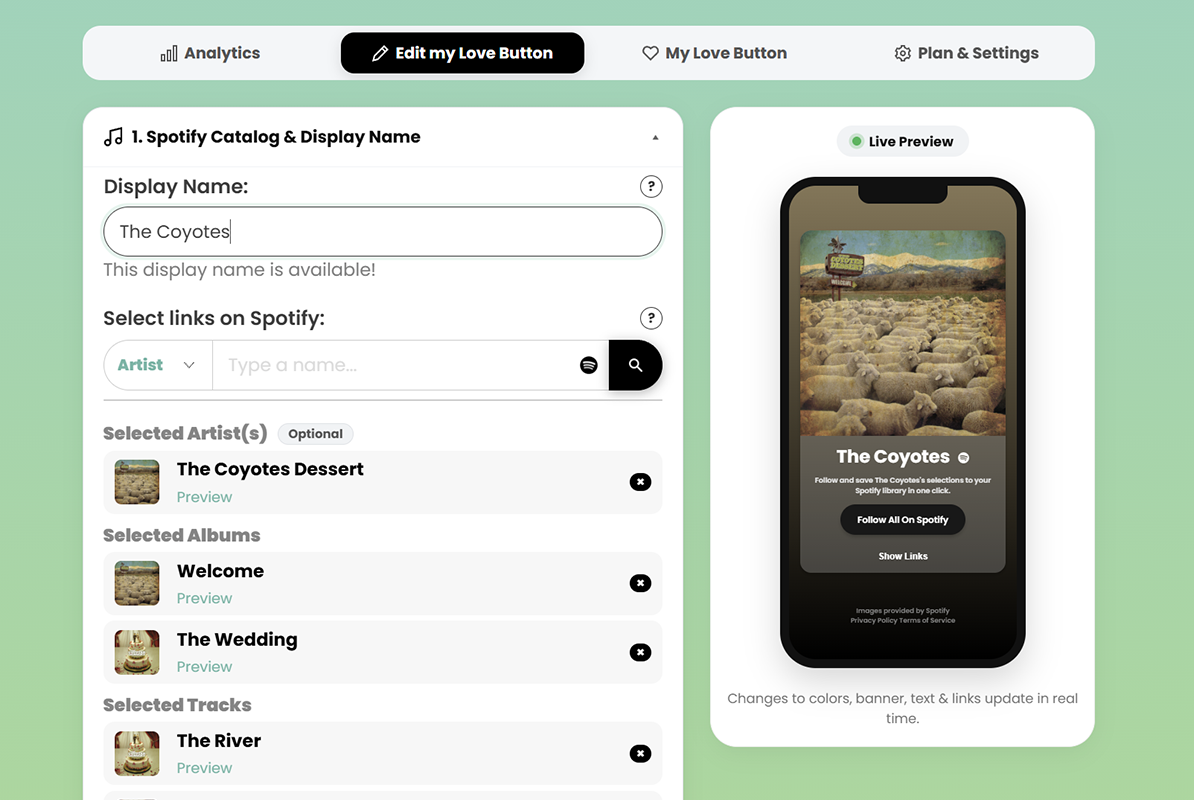
Instead of asking your fans to navigate a maze of buttons, Love Button asks them to do one simple, powerful thing: Follow your artist profile and save your best tracks to their Spotify library in one single click.

No app redirects. No getting lost in browser logins. One click, and they are permanently subscribed to your musical universe.

How to Build a High-Converting Page in 3 Minutes

Transitioning from a confusing Linktree to a highly optimized Love Button is incredibly fast. Here is how you can set up your ultimate conversion page right now:

Step 1: Claim your identity & curate your tracks
Sign up for your free Love Button account and connect your Spotify artist profile. Instead of just pushing one single, select the ultimate bundle: your new release, your best-performing past single, and your artist profile itself.

Step 2: Use the perfect hook
Forget generic phrases like “Check out my music.” On your Love Button creation form, go to the “Custom Text” section. We’ve already pre-filled the most transparent and effective conversion copy for you:

“Follow and save [Your Name]’s selections to your Spotify library in one click.”

This tells the fan exactly what is going to happen. It builds trust and clarity.

Step 3: Keep the design clean (Add socials the smart way)
But wait, what about your TikTok or Instagram links? Don’t worry, you don’t have to sacrifice them.

In the Love Button editor, simply toggle the “Add Social Links?” option. Your social platforms will appear as sleek, minimal icons at the bottom of the page. They are there if a fan specifically looks for them, but they won’t distract from the massive, central “Follow All on Spotify” button.

Stop Leaking Traffic

Every time a potential fan clicks your bio link and bounces, you are leaving money and algorithmic growth on the table.

It’s time to stop giving your fans a directory, and start giving them an experience. Create your free Love Button today and turn your social media traffic into real Spotify followers.