Running paid advertising on Instagram Reels, Stories, or TikTok is one of the most effective ways for independent artists to scale their listener base. Yet, hundreds of musicians throw money into ad managers only to encounter the exact same frustrating outcome: plenty of link clicks, but almost zero increase in Spotify monthly listeners or algorithmic traction.
If your advertising budget is producing clicks without streams, you are likely suffering from two invisible conversion killers: the In-App Browser Trap and an unoptimized Spotify algorithmic signal.
Here is how to properly structure, track, and scale paid social ad campaigns that convert casual scrollers into active, recurring Spotify listeners.
1. Understanding the Algorithmic Goal: Saves vs. Passive Streams
Before spending a single dollar on Meta or TikTok, you must understand what Spotify’s recommendation algorithm is looking for. Spotify does not prioritize passive 30-second streams generated by casual clicks. Its recommendation algorithms—specifically Release Radar, Discover Weekly, and Radio—are powered by high-intent engagement signals:
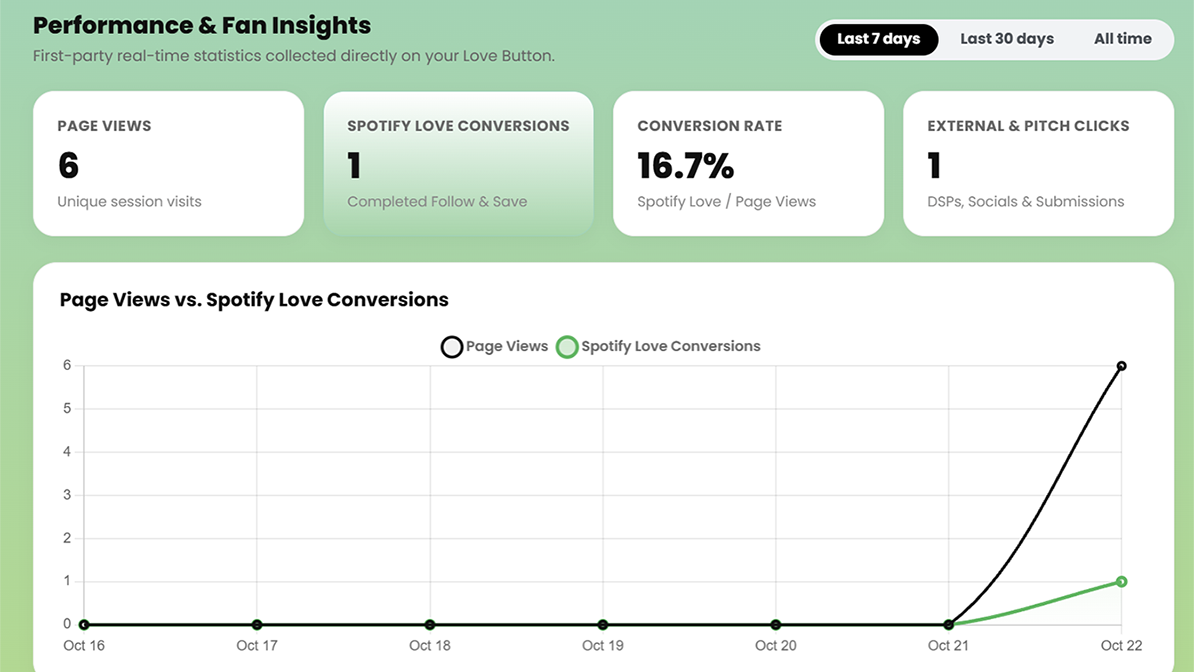
- Save Rate (Save-to-Stream Ratio): What percentage of listeners add your song to their Liked Songs or personal playlists? A healthy save rate is between 15% and 30%.
- Artist Follower Growth: When a user follows your profile, Spotify is algorithmically obligated to deliver your future releases straight into their personal Release Radar playlist every Friday.
- Completion Rate: Listeners who actively save your catalog rarely skip tracks, boosting your retention score across Spotify’s machine learning clusters.
A smartlink that triggers a verified 1-click Follow + Save simultaneously tells Spotify that your music has high listener retention, immediately signaling the algorithm to expand your organic reach.
2. Defeating the In-App Browser (IAB) Trap
The biggest technical barrier in music advertising is the In-App Browser. When someone clicks your ad inside Instagram, Facebook, or TikTok, the platform does not open their native browser (Safari or Chrome). Instead, it loads your landing page inside a sandboxed webview.
In standard smartlinks, this sandbox does not share authentication cookies with the Spotify app. When the user taps a standard link, they are greeted with an unfamiliar Spotify login screen. Almost nobody remembers their password while scrolling Instagram—and 80% abandon the page instantly.
How Love Button Solves the IAB Bottleneck:
Our smartlink architecture detects the user’s device environment automatically. On Android devices, it immediately executes an automatedintent://browser breakout to launch native Chrome. On iOS devices, it provides an immediate visual prompt instructing the fan to tap the three dots (⋮) and select “Open in Default Browser,” ensuring frictionless Spotify OAuth authorization.
3. Pixel Architecture & Retargeting Setup
Never run an ad campaign without tracking your audience. Running ads without pixels is equivalent to throwing away your fan data.
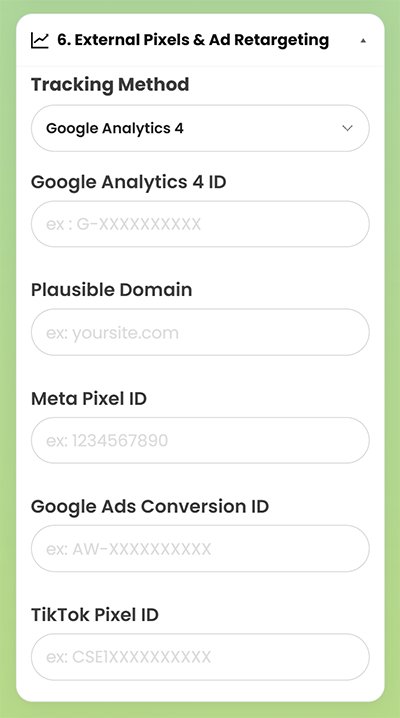
Within your Love Button Pro dashboard, navigate to the External Pixels & Ad Retargeting section and plug in your tracking credentials:
- Meta Pixel ID: Fires automatically on page visits and enables you to build warm Custom Audiences inside Meta Ads Manager.
- TikTok Pixel ID: Monitors traffic arriving from TikTok Spark Ads and profile campaigns.
- Google Ads Conversion ID & GA4 / GTM: Tracks cross-channel attribution across YouTube and Google Search ads.
- Server-Side Conversion API (CAPI): Back-end server tracking ensures conversion data is recorded even when client-side ad blockers or iOS 14.5+ privacy protections are active.
4. Ad Creative Frameworks That Convert on Reels & TikTok
Do not waste ad spend showing a static album cover with a waveform animation. High-converting mobile video ads rely on authentic, creator-led visuals. Test these three proven creative formats:
| Creative Format | Visual Hook | Audio & Call to Action |
|---|---|---|
| The Studio Vulnerability | Close-up of your DAW project session, drum machine, or guitar while isolating an emotional vocal track. | « I almost deleted this chorus… if you like Tame Impala or Phoebe Bridgers, tap below to save it on Spotify in 1 tap. » |
| The Genuine Reaction (POV) | Filming a bandmate, producer, or friend hearing the final master for the first time in a car or living room. | Cut the audio right before the drop or emotional peak: « Full song drops today. 1-tap save link below. » |
| The Lyric Resonance | Cinematic, high-contrast B-roll (night driving, candid tour footage) with dynamic karaoke-style subtitles. | Feature your single most relatable, hard-hitting lyrical line directly on screen. |
5. Configuring Your Campaign in Meta Ads Manager
To maximize your return on ad spend (ROAS), follow these campaign settings:
- Campaign Objective: Choose Traffic (optimized for Landing Page Views) or Sales/Leads if optimizing for custom pixel conversion events. Never optimize for simple “Link Clicks”—this signals Meta to target low-quality bot accounts.
- Placements: Restrict placements to mobile-first environments: Instagram Reels, Instagram Stories, and TikTok Feed. Exclude desktop feeds and Audience Network.
- Geographic Targeting: Target tier-1 music consumption countries (United States, United Kingdom, Canada, Germany, France, Australia) or regions where your specific genre commands high streaming engagement. Cross-reference your Top 5 Countries in your Love Button analytics dashboard to discover where your organic fanbase is already growing.
- Build Your Retargeting Pool: Once your pixel logs 1,000+ visits, build a Custom Audience of past visitors (30 to 90 days) and create a 1% Lookalike Audience. Your future release campaigns will convert at significantly lower Costs Per Acquisition (CPA).
Scale Your Music Promotion Without the Leak
Eliminating conversion friction is the single highest-leverage improvement you can make to your music marketing strategy. When every dollar spent delivers fans directly into your Spotify ecosystem with a single tap, your organic algorithmic reach compounds with every release.